
 Stone Cutting Machines
 Stone Polishing Machines
 Bridge Saw Machines
 CNC Stone Wire Saw Machine
 Stone Engraving Machines
 Stone Veneer Saw
 Stone Quarry Machines
 Stone Band Saw Machines
 Stone Edging Beveling Machine
 Other Stone Machines
 Stone Diamond Tools
 Stone Slab Cutting
 Stone Slab Surface Edge Polishing
 Stone Block Slicing
 Stone Quarry Mining
 Stone Horizontal Splitting
 Stone Engraving Applications
 CNC Stone Cutting
 Countertop Cutting Polishing
 Other Applications
In a high-volume stone fabrication shop, a machine breakdown is a factory manager’s worst nightmare. Every hour your CNC bridge saw sits idle, you are losing hundreds of dollars in production capacity and delaying crucial client installations. When an alarm flashes on the touchscreen or a cut goes out of square, panic is not the solution—systematic diagnosis is.
According to technical guidelines from Confindustria Marmomacchine (the renowned Italian Association of Makers of Machinery for Stone Processing), over 90% of sudden machinery stoppages are caused by minor sensor faults, lack of lubrication, or software input errors rather than catastrophic mechanical failures. In this advanced troubleshooting guide, we will teach you how to diagnose and resolve the most common bridge saw issues right on your factory floor.

Resolving Common Cutting Inaccuracies
These are the most frustrating “hidden” faults. The machine turns on, the motors run, and there are no alarms on the screen, but the stone pieces coming off the table are wavy, chipped, or refuse to fit together during installation. This usually points to mechanical wear or poor calibration.

Wavy Cuts and Blade Deflection
If your straight cuts look like ocean waves, the diamond blade is deflecting (bending). The Fix: First, ensure the blade flange is securely tightened and not warped. Next, check if you are forcing the blade too fast through hard quartzite; reduce the feed rate by 30%. Finally, inspect the X and Y-axis linear guides. If they are completely dry, the immense friction will cause the heavy cutting head to stutter and shake, creating a wavy edge.

Out of Square Cuts (Diagonal Errors)
You programmed a perfect rectangle, but the machine cut a parallelogram (the diagonals do not match). The Fix: For standard gantry saws, the two Y-axis motors (on the side beams) have lost synchronization. This happens if one side hits an obstacle or if the concrete foundation has settled unevenly. You must clear the gear racks of all debris, re-level the beams, and perform a CNC “Zero Return” calibration to resync the dual servo motors.
Diagnosing Servo Motor and Axis Alarms
When a bright red error code suddenly freezes your CNC touchscreen, the machine’s self-preservation protocol has been triggered. Understanding these alarms is the quickest way to locate the physical problem.

X or Y-Axis Overload Errors
An “Axis Overload” alarm means the servo motor is drawing too much amperage trying to push the bridge, so it shuts down to prevent catching fire. The Fix: Do not just reset the alarm and keep pushing! Physically inspect the gear racks. A small piece of crushed quartz is likely jammed between the gear teeth, or the linear bearing blocks have completely seized due to a lack of grease. Clean the racks thoroughly with a wire brush.
Z-Axis Plunge Failures or Stuttering
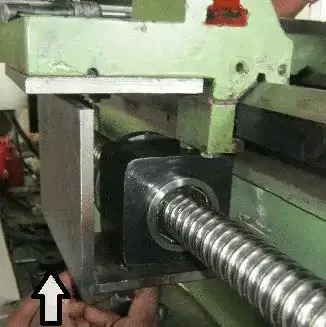
The cutting head refuses to lower, or it stutters violently as it plunges into the stone. The Fix: The Z-axis relies on a vertical ball screw. Because it is often hidden behind an accordion cover, operators forget to grease it. It will rust and seize up from the ambient humidity. Remove the cover, apply penetrating oil to break the rust, clean it, and pack it with heavy lithium grease. Also, wipe clean the Z-axis proximity sensor, which might be blinded by mud.
Pneumatic and Vacuum Lifter Malfunctions
The pneumatic (air) and hydraulic (fluid) systems act as the muscles of the machine. When air pressure drops or fluids leak, the automated handling features of your bridge saw will become dangerously unpredictable.

Insufficient Vacuum Suction / Dropping Slabs
If the vacuum manipulator fails to pick up pieces or drops them mid-air, you have a pressure leak. The Fix: First, check the factory’s main air compressor; the saw requires a constant 6 to 8 Bar of pressure. Next, inspect the white rubber suction pads for micro-tears or hardened edges. Finally, listen closely to the air hoses running along the bridge—vibration often causes these hoses to rub against the steel frame until they wear a hole and leak air.

Worktable Tilting Failures
You press the button to tilt the table up for loading, but nothing happens. The Fix: Check the hydraulic fluid reservoir level first. If the fluid is full and you can hear the pump motor whining but the table won’t move, the issue is almost always a jammed solenoid valve. Stone dust can enter the hydraulic system and block the valve from opening. A technician must remove and clean the directional solenoid valve.
Software Glitches and Sensor Errors
Top-tier CNC controllers like Italian ESA or Pegasus are incredibly robust. When a “software glitch” occurs, it is rarely a bug in the code. It is almost always caused by a poorly formatted CAD file or a physical sensor sending bad data to the computer.

CAD Import Errors and Freezing
You insert a USB with a DXF file, and the CNC screen freezes or throws a “Geometry Error.” The Fix: The machine’s software cannot process “dirty” drawings. Take the file back to your office PC. Open it in AutoCAD and ensure there are no overlapping lines, unjoined intersections (broken paths), or complex 3D splines. Use the “Overkill” command to clean the drawing, join all lines into a single continuous polyline, and re-export it as an older DXF format (e.g., AutoCAD 2004).
Hard and Soft Limit Switch Triggers
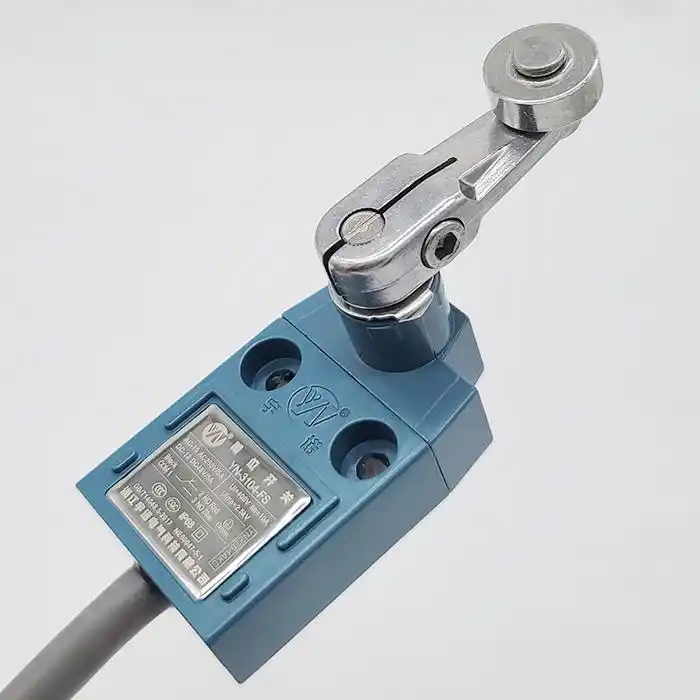
The machine stops abruptly and displays “Hardware Limit Triggered.” The Fix: A physical limit switch at the end of the track has been hit. This happens if you program a cut that is larger than the machine’s physical boundary, or if stone mud has glued the switch’s spring-loaded arm into the “pressed” position. Clean the switch with a rag. To recover the machine, switch the CNC to “Jog / Manual” mode and slowly drive the head away from the boundary.
Conclusion & When to Call the Experts
Empowering your operators to handle basic mechanical cleaning, lubrication, and CAD troubleshooting will drastically reduce your factory’s downtime. However, if you experience burnt-out electrical contactors, repeated inverter failures, or severe geometric misalignment, you have reached the limit of DIY repairs. Always disconnect the main power and call a certified technician to handle high-voltage components and deep servo calibrations.
Is Your Old Machine Beyond Repair?
If you spend more time troubleshooting your bridge saw than you do cutting stone, it is destroying your profitability. Upgrade to MOSCUT’s ultra-reliable, heavy-duty CNC series equipped with advanced diagnostic software.
Explore Reliable MOSCUT Bridge SawsTop 10 FAQ: CNC Troubleshooting
Quick reference guide for the most common emergency situations operators face on the factory floor.
Mechanical & Cutting Issues
1. The spindle is making a loud screaming/grinding noise. What should I do?
Hit the emergency stop immediately. This noise usually indicates that the internal ceramic or steel bearings inside the spindle have failed due to water ingress or age. Running it further will cause catastrophic motor failure. The spindle needs to be rebuilt.
2. Why does the blade stall or stop spinning mid-cut?
The blade is getting pinched. This happens if the slab is moving slightly on the table because it wasn’t clamped or sucked down properly. It can also happen if you are cutting a severely bowed slab and the tension pinches the steel core of the blade.
3. Why is my water pump running but no water reaches the blade?
The system is clogged with stone mud. First, check the filter screen in your water recycling pit. If that’s clean, disconnect the water hose at the spindle head and blow compressed air backwards through the water ring to dislodge mud blocking the nozzles.
4. The cutting head vibrates violently when moving diagonally. Why?
Diagonal movement requires the X and Y motors to push simultaneously. If one axis has dry, ungreased rails and the other is smooth, the motors fight each other, causing extreme vibration. Deeply clean and grease all gear racks.
5. How do I fix a machine that cuts 1mm too short on every piece?
This is a tool calibration error. The CNC software thinks the diamond blade is thinner than it actually is. You must go into the tool settings menu and input the exact current “Kerf” (thickness) of your diamond blade so the software compensates correctly.
Electrical & Software Issues
6. The touchscreen is completely black, but the machine has power. Why?
Open the electrical cabinet. Check the internal 24V DC power supply that feeds the PC and screen; it may have blown a fuse. Alternatively, the internal cooling fan may have failed, causing the industrial PC to overheat and shut down to protect itself.
7. How do I clear an emergency stop (E-Stop) error?
First, physically twist and pull out all red E-Stop buttons on the control panel and the wireless pendant. Then, press the “Reset” or “Machine Enable” button on the screen to clear the software lock. Finally, perform a home/zero return.
8. The CNC says “Inverter Fault.” What does this mean?
The inverter (VFD) controls the speed of the main spindle. A fault usually means the spindle was pushed too hard and drew too much current, or there was a sudden voltage spike in your factory’s electrical grid. Restart the machine; if it persists, the VFD may need replacement.
9. Why does the machine refuse to execute a program even though it’s loaded?
Check your safety interlocks. If the water pressure sensor detects no cooling water, or if the optional safety enclosure doors are not fully closed and latched, the CNC will refuse to spin the blade as a safety precaution.
10. I accidentally bumped the cutting head with a forklift. What should I check?
Never run the machine immediately. Visually inspect the spindle casting for cracks. Check the blade flange for bending. Most importantly, you must perform a dial indicator test to ensure the spindle shaft isn’t bent, and recalibrate the zero-point of the X and Y axes.