
 Stone Cutting Machines
 Stone Polishing Machines
 Bridge Saw Machines
 CNC Stone Wire Saw Machine
 Stone Engraving Machines
 Stone Veneer Saw
 Stone Quarry Machines
 Stone Band Saw Machines
 Stone Edging Beveling Machine
 Other Stone Machines
 Stone Diamond Tools
 Stone Slab Cutting
 Stone Slab Surface Edge Polishing
 Stone Block Slicing
 Stone Quarry Mining
 Stone Horizontal Splitting
 Stone Engraving Applications
 CNC Stone Cutting
 Countertop Cutting Polishing
 Other Applications
Purchasing a heavy-duty bridge saw is arguably the most critical and expensive investment a stone fabrication shop will ever make. If you choose the wrong machine—whether it lacks the necessary axes for complex profiles or has too much capacity for your small workshop—it can create severe production bottlenecks and drain your profits.
According to industry insights from Stone World Magazine, the transition toward intelligent, automated CNC machinery is no longer optional for fabricators who want to stay competitive. In this ultimate buying guide, we will act as your engineering consultant, walking you through the 5 critical steps to choose the perfect bridge saw that aligns with your budget, factory size, and long-term production goals.

Step 1: Assess Your Production Goals and Volume
Before looking at machine specifications, you must look at your own business. What kind of products are you selling, and how many slabs do you need to process every day? Your current and future order volume will dictate the tier of machinery you require.

Low Volume / Basic Cut-to-Size
If your shop primarily focuses on basic cut-to-size orders, simple flooring tiles, or entry-level monument block sizing, a Standard Laser Bridge Saw or a basic 3-axis machine is sufficient. These machines are highly cost-effective, easy to maintain, and rely on manual or semi-automatic laser alignment to execute rapid, straight cuts without complex software programming.

High Volume Countertops
If your core business is producing dozens of kitchen and bathroom countertops weekly, you need automation. A 4-Axis CNC Bridge Saw is your workhorse. It can automatically slice the slab into countertop dimensions and seamlessly switch to a router bit to mill out exact sink and stovetop holes, drastically reducing your reliance on expensive manual labor.

Luxury Custom / Architectural Elements
If you are targeting the high-margin luxury market—fabricating seamless waterfall islands, bookmatched marble walls, solid stone sinks, and complex 3D Roman columns—you must invest in a 5-Axis CNC Bridge Saw. This allows you to say “yes” to any complex architectural design your clients demand.
Step 2: Monoblock vs. Standard Gantry Structures
The physical structure of the machine determines how it will be installed in your factory and how much stability it provides during heavy cutting operations.
Monoblock Bridge Saws
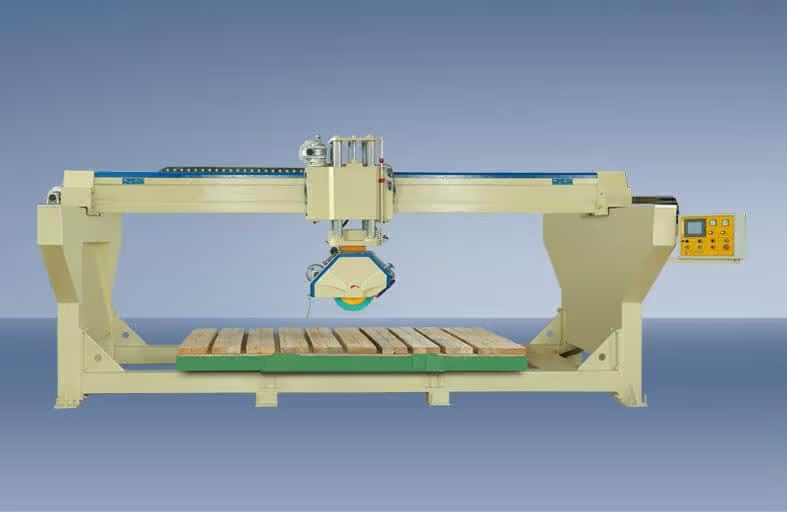
A “Monoblock” design means the side beams, cutting bridge, and worktable are integrated into a single heavy-duty steel frame. The biggest advantage: It requires no special concrete foundation. It installs on any flat factory floor in hours, and if you move to a new warehouse, the machine moves with you easily. It is the top choice for 80% of modern countertop fabricators.

Standard Gantry Bridge Saws
A traditional gantry saw requires building thick, reinforced concrete walls in your factory to support the side guide rails. The worktable sits independently on the floor. The biggest advantage: Absolute, unwavering rigidity. Because the rails are bolted to solid concrete, this structure is preferred for cutting extreme heavy-duty monument blocks.
Step 3: Understanding the Axes (3-Axis vs. 4-Axis vs. 5-Axis)
In the CNC machinery world, the term “Axis” refers to the directions the cutting head can move. The more axes a machine has, the more complex the shapes it can create.

3-Axis Bridge Saws
The cutting head moves Left/Right (X-axis), Forward/Backward (Y-axis), and Up/Down (Z-axis). This setup is strictly for cutting straight lines and sizing square or rectangular slabs. The blade cannot rotate automatically, meaning all direction changes require rotating the worktable.

4-Axis Bridge Saws
In addition to X, Y, and Z, the 4-axis machine features a C-axis, meaning the cutting head can rotate 360 degrees automatically. This allows the machine to cut continuous curved lines, perfect circles, and complex 2D polygons. Most 4-axis machines also accommodate a milling router bit for sink hole cutouts.

5-Axis Bridge Saws
The ultimate fabrication center. It features X, Y, Z, C, plus the crucial A-axis. The A-axis allows the cutting head to tilt continuously from 0° to 90°. This enables flawless, automated 45-degree miter cuts for seamless joints and allows the machine to carve true 3D volumetric profiles, like sloping sink basins.
Step 4: The Importance of the CNC Control System
Never judge a machine purely by its heavy steel frame. If the software running the machine is outdated or overly complicated, your operators will struggle, and production will halt. Software is productivity.
When selecting a CNC bridge saw, ensure it utilizes a top-tier control system, such as the renowned Italian ESA or Pegasus software. The system must support seamless CAD/DXF file importation, allowing your draftsmen to design templates in the office and push them directly to the machine’s touchscreen. A user-friendly interface with visual simulation capabilities will dramatically reduce the learning curve for your factory workers.
Step 5: Consider Smart Add-Ons for Maximum Yield
High-end machinery offers optional smart features. While they increase the initial purchase price, they provide a massive return on investment (ROI) by saving expensive raw materials and reducing manual labor.

Overhead Camera System (Photo Nesting)
Particularly vital for luxury marble and sintered stone fabricators. A high-resolution camera takes a top-down photo of the slab. The operator can drag digital cut pieces around on the screen to avoid natural cracks or precisely align the stone’s veining for a perfect bookmatched visual effect.

Integrated Vacuum Lifter
An automated suction pad mechanism attached to the spindle head. Once a piece of stone is cut, the machine automatically lifts it and moves it safely out of the way. This allows the machine to cut an entire slab unattended without a human operator reaching into the danger zone to remove heavy pieces.
Make Your Investment Count
Choosing the right bridge saw is a balance between your current budget and your future ambition. A 4-axis monoblock might be the perfect workhorse for a busy countertop shop, while a fully-loaded 5-axis CNC with a camera system is indispensable for a high-end custom masonry firm.
Find the Perfect Bridge Saw for Your Factory
Whether you need a reliable straight-cutting workhorse or a 5-axis smart fabrication center, MOSCUT engineers the exact solution for your needs. Browse our premium machine series today.
Explore the MOSCUT Bridge Saw SeriesTop 10 FAQ: Buying a CNC Bridge Saw
Navigating equipment specifications and installation logistics can be daunting. Review our top FAQs to clarify your budgeting and operational requirements.
Machine Selection & Capabilities
1. How much does a bridge saw cost?
Prices vary significantly based on capability. A basic manual laser bridge saw can start around $10,000–$15,000. A standard 4-axis monoblock CNC ranges from $25,000 to $45,000, while a fully automated 5-axis Italian-system machine with a camera and vacuum lifter can range from $60,000 to over $100,000.
2. Can a 4-axis machine do 45-degree miter cuts?
Typically, no. While a 4-axis machine can rotate 360 degrees (C-axis) to cut curves, it usually cannot tilt the blade (A-axis) to cut bevels. You generally need a 5-axis machine or a specialized manual tilt head for perfect 45-degree miter joints.
3. Can a bridge saw cut ultra-compact Sintered Stone?
Yes, but it requires a rigid, high-precision machine (preferably CNC) to control the exact plunge speed and feed rate, along with specialized diamond blades designed specifically for the extreme tension of sintered surfaces.
4. What is the difference between a spindle and a router bit?
The spindle is the main motor. It holds the large circular diamond saw blade for straight cuts. On advanced machines, the spindle also features a 1/2″ gas fitting to remove the blade and attach a small “router bit” (a milling tool) to drill holes and cut sink openings.
5. Do I need a camera system if I only cut solid-color quartz?
If you exclusively process solid-color artificial quartz with no veining, an overhead camera is less critical. However, if you process natural granite, quartzite, or veined marble, the camera is essential for avoiding natural fissures and matching patterns.
Installation & Budgeting
6. How much factory floor space do I need?
You need a significant footprint. The machine itself usually requires an area of about 6 meters by 4 meters (20 ft x 13 ft). You also need to factor in safe clearance around the machine for operators and a clear path for the forklift or overhead crane to load slabs.
7. Is a concrete foundation mandatory?
Only if you purchase a traditional Gantry-style machine. If you purchase a Monoblock bridge saw, you only need a standard, flat, and level industrial concrete floor capable of supporting the machine’s weight.
8. Can I run the machine on single-phase residential electricity?
No. Industrial bridge saws utilize heavy-duty 15kW to 22kW spindle motors that require a stable 3-Phase commercial electrical supply (e.g., 220V 3-Phase, 380V, or 480V depending on your region).
9. What other equipment is required to run the saw?
You will need a reliable industrial air compressor to operate the pneumatic components and the vacuum lifter, as well as a continuous, high-volume water supply (preferably a water recycling/clarification system) to cool the blade.
10. How long does installation and training take?
For a Monoblock 4-axis or 5-axis CNC, physical installation usually takes 1 to 2 days. Software training and machine calibration typically require an additional 3 to 5 days of on-site instruction by our engineers.